

How to Set Up Payouts and Transfer Your Funds
💰 Time: 5–10 minutes | 🔒 Verification: handled by Stripe
Where is it?
Everything about your money lives in your Profile, under the Funds tab:
- Go to fundlyhub.org/profile
- Click the Funds tab
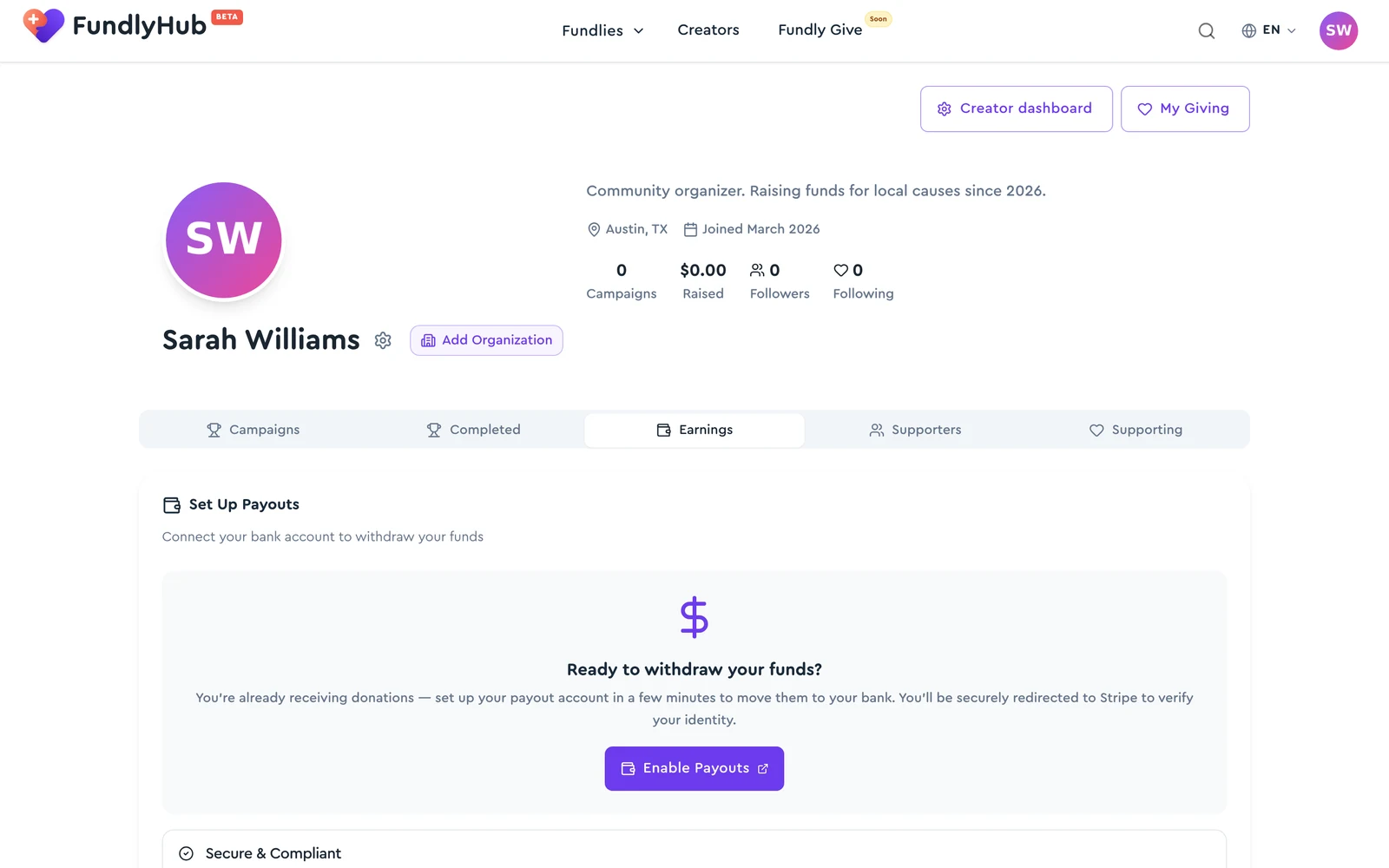
You can also reach it from the user menu → Funds, and the setup screen itself is at fundlyhub.org/payouts/setup.
Why you need this
You can start raising money straight away — donations arrive whether or not you have set payouts up. What setup adds is the route out: a verified identity and a bank account, so FundlyHub can send you what you have raised.
Payments and identity verification are handled by Stripe, our payment provider. FundlyHub never stores your banking information.
Step 1: Start setup
On the Funds tab, click Set Up Payouts.
A short screen explains what is about to happen — secure bank transfers, identity verification, and that your banking details stay with the payment provider. Click Continue when you are ready.
Step 2: Enter your details
You'll be taken to a secure page to fill in:
- Email — your working email
- First and last name — as they appear on your ID
- Date of birth — for verification
- Address — ZIP code and city
- Bank account — where the money will arrive
Step 3: Verification
After you submit, you may be asked for:
- A selfie with your ID
- A photo of your bank card
- Phone number confirmation
Step 4: Done
Once verification clears, you'll get a confirmation email and an in-app notification saying your payouts are ready.
Once you have raised anything, the Funds tab shows four tiles, ordered by how money moves through it:
- Total Raised — what your fundraisers have collected, after payment-processing fees. Tips donors leave for FundlyHub are not part of this number
- Processing — money on the way but not yet ready to transfer (click to see the breakdown — see below)
- Available — cleared and ready to send to your bank
- Transferred — already sent to your bank
While you still have cleared money that cannot be sent yet because setup isn't finished, the third tile reads Awaiting setup instead of Available, with the note "Set up payouts to receive this". Clicking that tile takes you straight into setup. That money is not lost — see below.
What's in "Processing"? (View breakdown)
The Processing tile is clickable. Tap View breakdown and a dialog opens showing exactly where your processing money is, donation by donation. It can have up to three sections:
| Section | What it means |
|---|---|
| Payments clearing | Pending until your card transactions settle — typically 2–7 days. |
| Awaiting settlement | Donations to your fundraisers from before you set up payouts, still inside their hold period. The dialog shows the Available on date for each one. |
| Ready to transfer or Ready to pay out | Cleared money that hasn't reached you yet. Which title you see depends on whether your payouts are set up — see below. |
Each row links to the fundraiser the donation came in on. If a section is empty it's hidden; when nothing is processing you'll see "No pending donations — you're caught up." There is no refresh button: these are settlement dates that move on the payment provider's clock, over days, so re-checking within a session would only redraw the same numbers. Reopen the dialog later, or use Retry if it failed to load.
The third section is the one that changes depending on your setup:
- Payouts already set up → the section is titled Ready to transfer: "Cleared and queued for transfer on the next sweep — usually within hours." If an amount stays there for more than 24 hours, email tech@cyty.io.
- Payouts not set up yet → the section is titled Ready to pay out: "Cleared and waiting on your payout setup. Connect your bank account to receive it." A Set Up Payouts button sits underneath it. Nothing will move on its own here, and support cannot release it for you — finishing setup is what unblocks it.
Money received before you set up payouts isn't lost
Donations that arrive before you finish setup are held safely by FundlyHub. While a donation is still inside its hold period you'll see it under Awaiting settlement; once it clears, it moves into Ready to pay out. Finish your payout setup and each of those cleared charges transfers to your balance automatically — you don't have to release them one by one.
How do I get the money?
When there's an available balance:
- Go to Profile → Funds
- Click Transfer to Bank
- The full available balance is sent to your default bank account
The transfer has to be at least $1.00, and it can never exceed your available balance. The money arrives within 2–7 business days.
Automatic payouts
Under Payout Schedule you can switch from manual transfers to automatic daily, weekly, or monthly payouts, so you never have to press the button yourself. On a manual schedule, funds stay in your available balance until you transfer them.
💡 Worth knowing
- Payment processing fee: 2.9% + $0.30 per payment, taken out before the money reaches your balance
- Transfer time: 2–7 business days
- Minimum transfer: $1.00
- Currency: USD
What the words mean
FundlyHub support describes money with the lifecycle held → settled → released → paid out, which doesn't match the plainer words on your Funds tab, and neither matches the literal values the API returns. If you're comparing notes with support, or reading the Payouts API reference, this is the same money under three names:
| What you see | What support sees | What the API returns |
|---|---|---|
| Processing — still inside its hold period | Held, pending settlement | pending, plus breakdown state destination_charge_pending or platform_held_unsettled |
| Awaiting setup / Ready to pay out — cleared, but blocked on your setup | Held and settled, awaiting onboarding | readyToPayOut, plus breakdown state platform_held_settled with has_payout_account: false |
| Ready to transfer — cleared, queued for the next sweep | Settled, awaiting release | counted inside pending; breakdown state platform_held_settled with has_payout_account: true |
| Available — in your balance, yours to send | Released into your connected account | available |
| Transferred — on its way to your bank | Paid out | withdrawn, and a payment-provider payout status of paid or in_transit |
If support ever mentions a payment being under review, it is about FundlyHub's own records, not about your balance.
FAQ
Can I use a non-US bank account? For now, payouts on FundlyHub work primarily with US accounts.
What if verification was rejected? Double-check your details and make sure they match your ID exactly. You can try again from the Funds tab, or contact support.
Do I have to set this up before I start fundraising? No. You can publish and collect donations first — the money is held for you until your payouts are ready. Setting up sooner just means it reaches you sooner.
Money stuck? Contact FundlyHub support: tech@cyty.io
Done! 🎉
You now know how to set up payouts and transfer your funds out of FundlyHub.